Welcome to our Frequently Asked Questions (FAQ) section, where we hope to provide valuable information and solutions for set-up errors. Set-up errors can be frustrating, but we're here to help you navigate them effectively. Whether you're encountering issues during the installation or configuration process of a product or service, this FAQ page is designed to address the most common issues during setup.
- Choose the Right Outlet: To begin, it's important to choose the right outlet for your smart pump. We recommend using a GFCI grounded outlet in your sump pit. This helps ensure the safety and proper functioning of your pump.
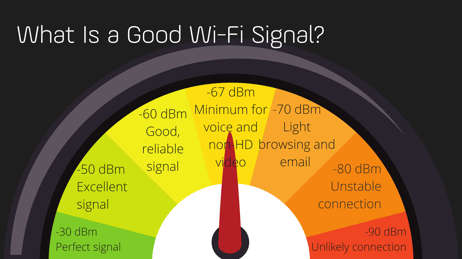
- Check Internet Strength: Before proceeding, make sure you have a good internet connection in the location where the pump will be placed. We have provided a graphic of what is considered an acceptable Wi-Fi signal. Add your smart pump to the app before you place it into your sump pit. More information on device setup can be found here - https://waynewater.zendesk.com/hc/en-us/articles/16927683049107-How-to-setup-my-Wayne-Water-Smart-Sump. To check the Wi-Fi strength in the mobile app, follow these steps:
- Click on the menu icon.
- Then, click on the sprocket icon to access the pump settings.
- Scroll down and locate the "Pump Wi-Fi Strength" option. Ensure that the strength is between -20 to -75 for optimal performance.
- Verify Network Compatibility: Your smart pump requires a 2.4 GHz network with an internet connection. Please ensure that this type of network is available, as it will not work with a 5 GHz-only network. Reach out to the router or modem manufacturer for further details.
-
Troubleshoot QR Code Scanning: If you encounter any issues while scanning the QR code, try the following troubleshooting steps:
- Grant camera permissions to the app by going to Settings > App > Camera and toggling it on.
- If the product QR code is still not focusing, try moving your camera back and forth until it is adequately focused. You can also try turning on your phone's flashlight for better visibility.
- If the product QR code is still not scannable, you can take a regular photo of the code and have it printed larger. Then, scan the printed version. This is a known issue that we are currently working to resolve. Alternatively, if you have another phone or tablet, you can take a photo of the product QR code with it, zoom in, and then scan the enlarged image.
- Troubleshoot Wi-Fi Connection: If you receive an error message during the Wi-Fi setup, it indicates an incorrect Wi-Fi password. Please verify that the password you entered is correct. We recommend attempting the setup process at least twice. The app will only display an error if the password is incorrect without specifying the exact error.
-
Check Router Settings: If you have access to your router's settings, it's worth checking a few configurations that might interfere with the smart pump's network traffic. Please review the following settings:
- QoS (Quality of Service): Ensure that the smart pump's network traffic is not restricted by any QoS settings.
- Ad Blocking: Ensure the router does not block any necessary URLs related to the smart pump's functionality.
- Firewall: Check if your router's firewall settings are preventing the smart pump from establishing a connection.
Note: If you are unfamiliar with changing router settings or feel uncomfortable, we recommend contacting your internet service provider or the router's manufacturer for assistance. Here are the specific URLs and ports that need to connect:
-
URLs:
-
api.iot8020.com
-
*.amazonaws.com
-
-
UDP/TCP Ports:
-
53: Domain name server
-
123: Network time
-
443: HTTPS/MQTT
-
8883: Alternate MQTT
-
We encourage you to follow these steps to resolve any issues you may be experiencing. Our team has put together comprehensive instructions to help you overcome common challenges. Give these steps a try, and if you still encounter difficulties, we're here to assist you. Don't hesitate to reach out to our dedicated team for personalized support and guidance. We value your satisfaction and are committed to ensuring a smooth experience for you. Together, we'll find a solution to any lingering issues you may face.